
Backup health
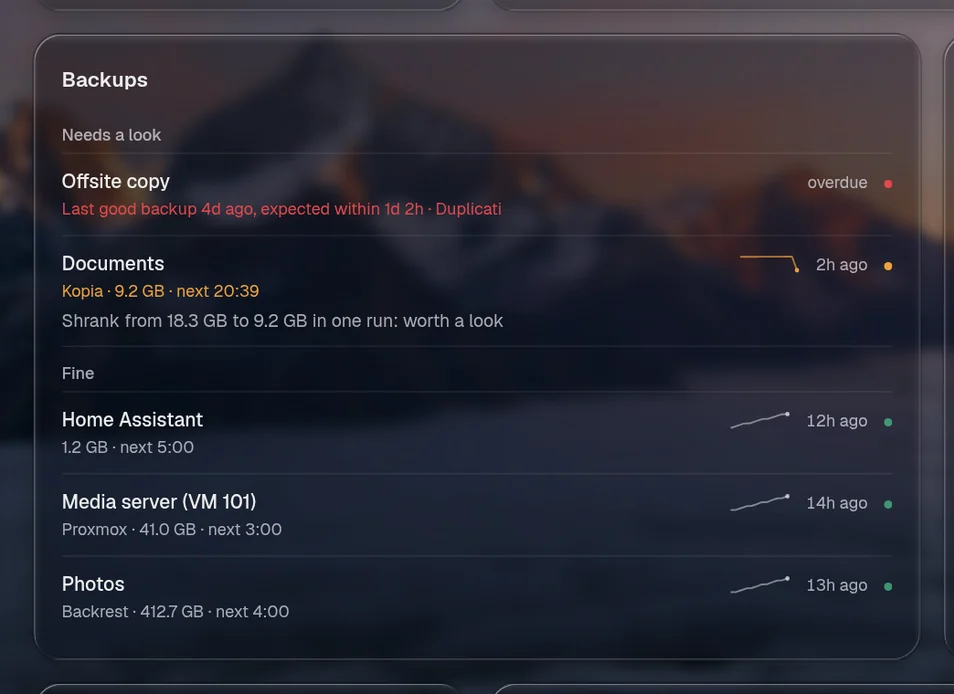
Valet gathers every backup job your services know about into one Backups card, so “are my backups okay?” has one answer. It appears as soon as an integration reports a backup, and you place it like any other card:
layout: - title: Services widgets: [valet.backups]What it shows
Section titled “What it shows”Jobs that need a look come first: failed, overdue, never worked, or a size that changed sharply. Then the healthy ones, each with when it last worked (“2h ago”), its size, when it runs next and a small line of its size over recent runs.
- Failed: its last run failed, and nothing has worked since.
- Overdue: no success within the time it should take. That comes from the service’s schedule when it says one (a tenth to spare, and at least an hour), from
backups.expectfor that job, or frombackups.overdue: 26 hours unless you change it. - Worth a look: the last run shrank by a third or more, or grew by half, against the one before. Changes under 50 MB don’t count. A backup that suddenly halves is often a missing mount.
Sizes come from the service’s own history when it keeps one (Proxmox does). Otherwise Valet remembers what it saw, one size per run, in data/backups.json.
Where it comes from
Section titled “Where it comes from”| Service | What it reports |
|---|---|
| Backrest | each plan: last good backup, last run and whether it failed, what it protects, the next run |
| Kopia | each source: last snapshot, its size, errors as a warning, the next snapshot and the interval |
| Duplicati | each job: last finish, last error, source size, the next run and its repeat |
| Proxmox VE | each guest that has backups: its newest vzdump on every backup storage, sizes run by run, and a failed backup task since |
| Proxmox Backup Server | each backup group in each datastore: its newest snapshot, and a failed backup task since |
| Home Assistant | its automatic backups (2025.1 and later): last success, last attempt and the next one |
| TrueNAS | cloud sync and replication tasks that are switched on |
| Healthchecks | any check with “backup” in its name or tags |
Immich and Paperless don’t report their own backups through their APIs, so they aren’t listed. A plugin can add any other.
When something goes wrong
Section titled “When something goes wrong”A job going wrong and coming right is told once each: a notice on the page, a line on the timeline, and a push to your notification channels. A failed job that also goes overdue is still one notice. What was already wrong the first time Valet looked isn’t news, but it’s on the card and in the page’s summary like any other problem.
Valet checks every 15 minutes even with the page closed, so a job that goes quiet overnight reaches your phone.
Asking
Section titled “Asking”“Are my backups ok?” gets the card in the chat, with the facts the assistant needs to answer: what’s wrong, when each last worked and when it should have. In ⌘K, type backups or check the backups to see the card with no model at all.
Options
Section titled “Options”backups: overdue: 26h # how long a job may go without a success when its service doesn't say its schedule expect: # that, per job, by name Offsite copy: 8d every: 15m # how often it checks with nobody looking notify: true # also push failures, overdue jobs and recoveries to notify.channelsbackups: false turns it all off.