
Your machines
Valet runs in a locked-down container, so it can’t see the machine it’s on, or any other. The Valet agent goes on each machine instead: one file, agent/valet-agent.py, written in Python’s standard library, with nothing to install. It answers Valet’s questions about that machine and can’t change anything.
With an agent on each machine, the machines integration shows them all from one block of config:
- every machine with whether it answers, CPU, memory, disk, temperature, load and uptime, and what’s wrong on it
- each machine’s containers and systemd services, grouped by machine
- the assistant answers “which machine is low on disk?”, “what’s running on the NAS?” and “why did Plex restart?” for every machine
- a machine that stops answering shows on the page the way a service that’s down does: in the line under the title, in notices and on the timeline
What the agent can report
Section titled “What the agent can report”Everything is off until you turn it on in the agent’s settings, on that machine.
| Setting | What it turns on |
|---|---|
VALET_AGENT_METRICS=1 | CPU, memory, swap, load, temperatures, uptime, the system’s name. Read from /proc and /sys. |
VALET_AGENT_MOUNTS=/,/mnt/media | With metrics: how full these mounts are. Only the ones you list. |
VALET_AGENT_UNITS=smbd,user:backup | These systemd services: state, restarts, how they last ended, and their logs. user: for a user service. |
VALET_AGENT_DOCKER=http://127.0.0.1:2375 | Containers, through a read-only socket proxy or a socket path: state, image, CPU and memory, and their logs. |
VALET_AGENT_CONTAINERS=plex,immich_* | With Docker: only these containers. All of them if left out. |
VALET_AGENT_ALLOW=10.0.0.2,172.17.0.0/16 | Only these addresses may ask. Anyone with the token if left out. |
VALET_AGENT_TOKEN (at least 24 characters) and VALET_AGENT_BIND (where it listens, 127.0.0.1:7576 by default) are the other two.
1. Install the agent
Section titled “1. Install the agent”On the machine, from a copy of the repository or just the two files in agent/:
install -m 755 agent/valet-agent.py ~/.local/bin/install -Dm 644 agent/valet-agent.service ~/.config/systemd/user/valet-agent.servicemkdir -p ~/.config/valet-agent && install -m 600 /dev/null ~/.config/valet-agent/envcat >> ~/.config/valet-agent/env <<XVALET_AGENT_TOKEN=$(openssl rand -hex 32)VALET_AGENT_BIND=10.0.0.5:7576VALET_AGENT_ALLOW=10.0.0.2VALET_AGENT_METRICS=1VALET_AGENT_MOUNTS=/,/mnt/mediaVALET_AGENT_UNITS=smbd,nfs-serverXsystemctl --user enable --now valet-agentloginctl enable-linger $USERIt runs as you, not as root. VALET_AGENT_BIND is the machine’s address on your home network or tailnet: never a public one. VALET_AGENT_ALLOW is the address Valet’s machine reaches it from.
Reading system services’ logs needs your user in the systemd-journal group. A Raspberry Pi needs nothing else: Python 3 comes with it.
Containers
Section titled “Containers”The agent never asks Docker for more than a list, a container’s numbers, its logs and how it last ended, and only ever with GET. Even so, give it a read-only way in, so that’s all it could ask: a socket proxy with POST=0 on the machine, listening only on that machine.
dockerproxy: image: tecnativa/docker-socket-proxy:v0.5.0 environment: { CONTAINERS: 1, POST: 0 } volumes: [/var/run/docker.sock:/var/run/docker.sock:ro] ports: ["127.0.0.1:2375:2375"] # only this machine reaches it read_only: true tmpfs: [/run, /tmp, /var/lib/haproxy] cap_drop: [ALL] security_opt: [no-new-privileges:true] restart: unless-stoppedThen VALET_AGENT_DOCKER=http://127.0.0.1:2375 in the agent’s settings. It can be given the socket itself (VALET_AGENT_DOCKER=/var/run/docker.sock), and it will still only send GET requests to its short list of paths, but then your user must be in the docker group, which is as good as root on that machine. Prefer the proxy.
Harder still
Section titled “Harder still”The unit file already keeps the agent from gaining privileges, writing anywhere, or making system calls a reader doesn’t need. On a machine where you’d rather it didn’t run as you at all, run it as its own user with a system unit:
sudo useradd --system --no-create-home --groups systemd-journal valet-agentsudo install -m 755 agent/valet-agent.py /usr/local/bin/sudo install -m 600 -o valet-agent /dev/null /etc/valet-agent.env # the same settings as above[Service]User=valet-agentEnvironmentFile=/etc/valet-agent.envExecStart=/usr/bin/python3 /usr/local/bin/valet-agent.pyRestart=alwaysNoNewPrivileges=trueProtectSystem=strictProtectHome=truePrivateTmp=truePrivateDevices=trueProtectKernelTunables=trueProtectKernelModules=trueProtectKernelLogs=trueProtectControlGroups=trueProtectClock=trueProtectHostname=trueRestrictNamespaces=trueRestrictRealtime=trueRestrictSUIDSGID=trueRestrictAddressFamilies=AF_INET AF_INET6 AF_UNIXLockPersonality=trueMemoryDenyWriteExecute=trueCapabilityBoundingSet=SystemCallArchitectures=nativeSystemCallFilter=@system-serviceSystemCallFilter=~@privileged @resourcesMemoryMax=96M
[Install]WantedBy=multi-user.targetAs its own user it can only report system services, not your user’s, and reads only what that user may read.
Updating it
Section titled “Updating it”Copy the new valet-agent.py over the old one and restart it:
install -m 755 agent/valet-agent.py ~/.local/bin/ && systemctl --user restart valet-agentValet tells you when an agent is older than it expects: the machine’s card says “update its agent”. An old agent that only knows services keeps working until you do.
2. List the machines in Valet
Section titled “2. List the machines in Valet”Each machine’s token goes in .env, and each machine gets a short name:
integrations: machines: type: machines hosts: nas: { url: "http://10.0.0.5:7576", token: "${NAS_AGENT_TOKEN}", name: NAS } pi: { url: "http://10.0.0.6:7576", token: "${PI_AGENT_TOKEN}", name: Attic Pi, quiet: [backup-job] } # the machine Valet runs on: the agent bound to the Docker bridge server: { url: "http://172.17.0.1:7576", token: "${SERVER_AGENT_TOKEN}" }3. Place the cards
Section titled “3. Place the cards”| Widget | What it is |
|---|---|
machines.fleet | Every machine, a row each: reachable, its numbers, what’s wrong. As a tile: “3 of 3”. |
machines.overview | The same machines side by side in a table, to sort by CPU, memory or disk. |
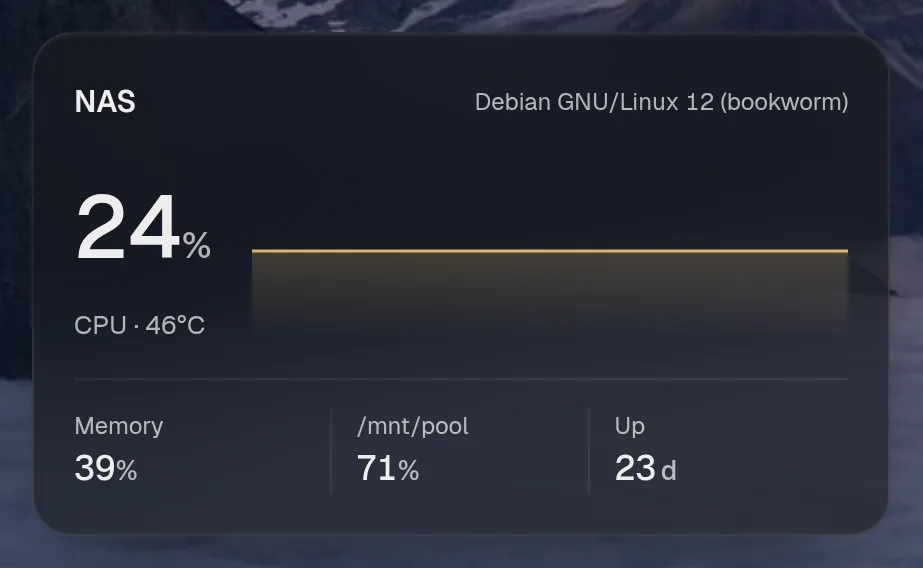
machines.nas | One machine: CPU over time, memory, its fullest disk, uptime. One widget per machine, by its name in hosts. |
machines.containers | Every machine’s containers, grouped by machine. |
machines.units | Every machine’s systemd services, grouped by machine. |
machines.disks | Every listed disk on every machine, fullest first in each. |
layout: - title: Machines widgets: [machines.fleet, { widget: machines.nas, size: small }, { widget: machines.pi, size: small }, machines.disks]
Adding another machine later
Section titled “Adding another machine later”- Install the agent on it, as in step 1, with its own token.
- Add its token to
.envand a line underhosts:. - Recreate the container (
docker compose up -d) so it reads the new variable.
That’s all: the fleet, the containers and services and the assistant pick it up. Place machines.<name> if you want its own card.
When a machine is down
Section titled “When a machine is down”A machine that doesn’t answer within timeout (4 seconds) is shown as not reachable, with when it was last seen, and never holds up the others. Its containers and services stay on their cards as they last were, under its name and “last seen”, and its own card keeps its last numbers, marked as not current. The line under the page’s title names it like a service that’s down, and live.notify can tell you:
live: notify: - { widget: machines.fleet, on: down } # "nas is down" - { widget: machines.fleet, on: up } # "nas is back"A wrong token says “refused the token”; an address VALET_AGENT_ALLOW doesn’t list says “refuses this address”.